
Build a customer package
Record requested items, connect documents, and establish the current package state for one customer.
Build the first customer package
Open a customer and add the items that customer currently expects.
Do not try to design a universal requirement library during the first setup. Record the real requested work for the customer in front of you.
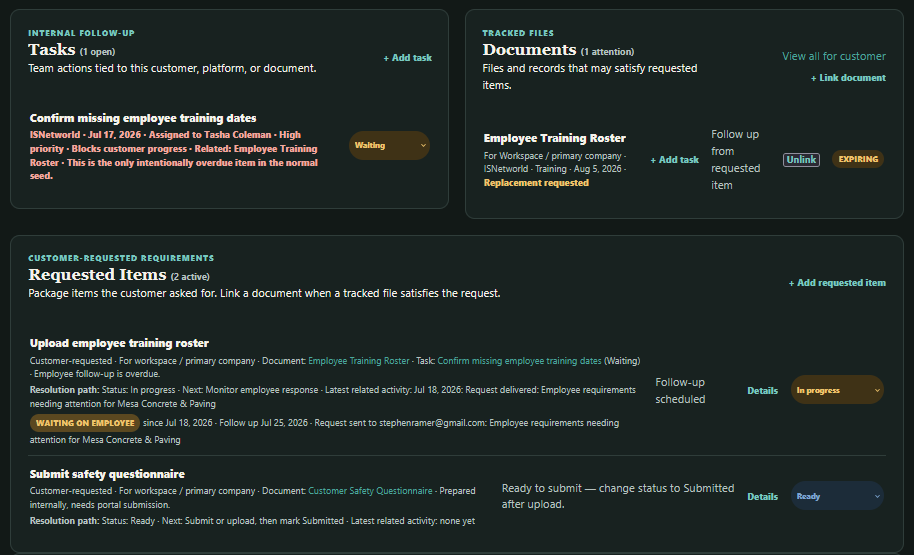 The customer page brings requested items, linked documents, and related internal tasks together in one working view. The Documents section on the customer page shows records already linked to that customer; new documents are added from the main Documents page.
Add requested items and tasks from the customer page. To create a new document, open Documents from the main navigation, add the document there, and link it to the customer or requested item as appropriate.
For each requested item, decide:
- Is it required?
- What is its current status?
- Does an existing document satisfy it?
- Does it belong to the workspace or a tracked party?
- Is your team waiting on someone?
- Is there a follow-up date?
- Is there a note that explains the current situation?
Common requested-item statuses include Missing, In progress, Ready, Submitted, Accepted, and Not applicable.
Use the status that describes the current operational state. A document being on file does not necessarily mean the customer has accepted it. Likewise, a submitted item may still be waiting on platform review.
Link documents to requested items
When an existing document satisfies a requested item, link the document to the item.
The requested item continues to describe the customer obligation. The document provides the tracked file or record associated with it. This relationship helps Customer Detail explain why an item is complete, still active, or waiting for replacement.
Add the documents already on file
For each document, record the information your team needs to manage it:
- A clear title
- Document category
- Current status
- Effective and expiration dates, when applicable
- Customer and platform relationships
- Subject or tracked party
- Notes that explain unusual conditions
Sidecar can assist with document intake by suggesting titles, categories, and dates through OCR. Suggestions should be reviewed before they are applied. OCR is there to reduce typing, not to make decisions on your behalf with the confidence of a scanner that once mistook a policy number for a ZIP code.